
Summarize
Summarize text with AI, without leaving your app
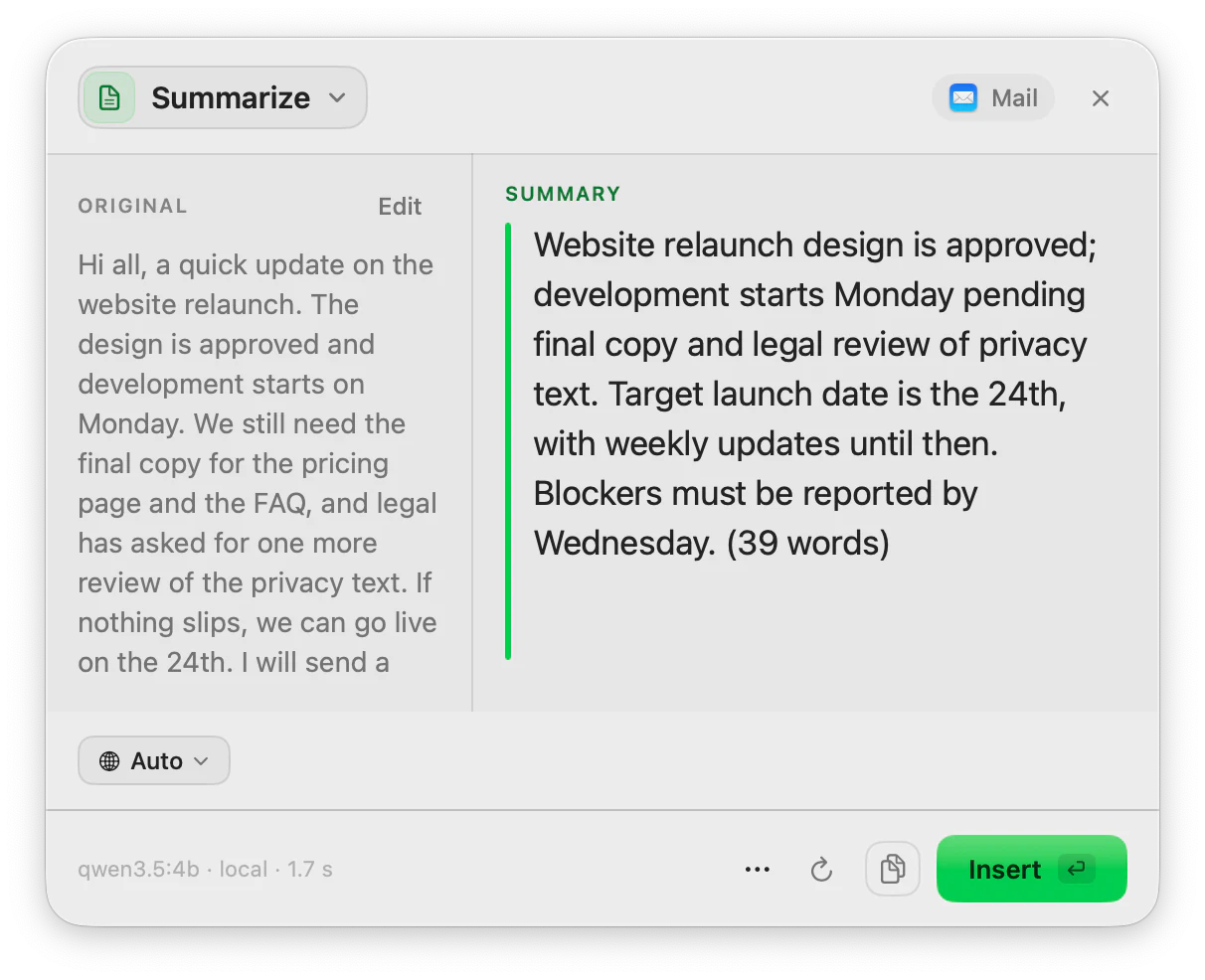
Select a long email, a note or an article, press your shortcut and read a short summary next to the original. Insert it, or copy it.
macOS 14 or later · Free while in beta · No subscription
In short
Summarize is the ToneMate action that condenses the text you select on your Mac into a shorter version. The prompt asks for a concise summary, roughly a third to a half of the original length, written as running text rather than a list. It also works on text you dictate and on PDF, TXT, Markdown and RTF documents, with a local model or your own API key.
Quick facts
- Aims for a concise summary of roughly 30 to 50 percent of the original length, as plain text.
- Works on a selection, on text you dictate, and on PDF, TXT, Markdown and RTF files (up to 200,000 characters).
- Regenerate keeps each version, so you can compare summaries before inserting one.
- Local models (Ollama, MLX) or your own cloud API key.
How it works
- 1
Select the text
Highlight the email, note or article you want shorter.
- 2
Press your shortcut
Use the shortcut you assigned to Summarize, or open it from the menu bar.
- 3
Read the summary
It appears next to the original. Press Regenerate for another version.
- 4
Insert or copy
Insert replaces your selection; Copy keeps the summary on the clipboard.
Documents, not only selections
Open a PDF, TXT, Markdown or RTF file in ToneMate and summarize it. The text is extracted with the system PDF reader, up to 200,000 characters, and ToneMate warns you from 30,000. There is no OCR, so a scanned PDF with no text layer cannot be summarized.
From a recording to a summary
Chain two actions in a pipeline: transcribe an audio file on your Mac, then summarize the transcript. Every step is shown while it runs, and the whole run is saved in your history.
Good to know
What it does not do, and what you need first.
- A summary leaves things out by design. Check anything that matters against the original, which stays visible next to it.
- Quality depends on the model, and very long texts take longer with a local model.
- PDFs need a text layer: there is no OCR for scanned pages.
- It works where you can select, copy and paste text.
Where it helps
A long email thread
Get the gist before you decide how to answer.
An article or a report
Skim a shorter version, then read the parts that matter.
Meeting notes
Turn rough notes into a few clear sentences.
A recording
Transcribe and summarize it in one pipeline.
Frequently asked questions
How long is the summary?
The prompt asks for a concise summary of roughly 30 to 50 percent of the original length. It is a target, not a guarantee, and it depends on the model.
Does Summarize produce bullet points?
It writes a concise summary as plain text. If you want a different format, run Rewrite on the result and ask for it.
Can it summarize a PDF?
Yes, PDF, TXT, Markdown and RTF files up to 200,000 characters. A PDF must contain a text layer: there is no OCR.
Is my text sent to a server?
ToneMate never sends your text to its own servers. With a local model your text is processed on your Mac; with a cloud model it goes straight to the provider whose API key you added. The app only contacts ToneMate to check your license.
Can I buy or download ToneMate today?
You can download it, but not buy it yet. ToneMate is in free beta: download the app and request a free license key, which has no fixed end date. The plan for the full version is a one-time purchase that includes 2 licenses; when the first stable version comes out, a 30-day free trial starts.
Keep exploring
- Expand / ShortenMake selected text longer or shorter while keeping its message, and see what changed.Learn more
- Transcribe audioDrop an audio file and get the text, transcribed on your Mac.Learn more
- TranslateTranslate selected text into one of 10 languages from a shortcut, with the model you choose.Learn more
- AnalyzeReview a text before you send it: suggestions you accept or skip one by one, two scores and a detected tone.Learn more
Summarize with ToneMate in the free beta
ToneMate is in free beta. Download it and request a free license key: we email it to you.
Last updated: