
Proofread
Proofread with AI, and see every change
Select the text, press your shortcut and read the corrected version with the changes marked. Accept it with one click, or copy it and keep writing.
macOS 14 or later · Free while in beta · No subscription
In short
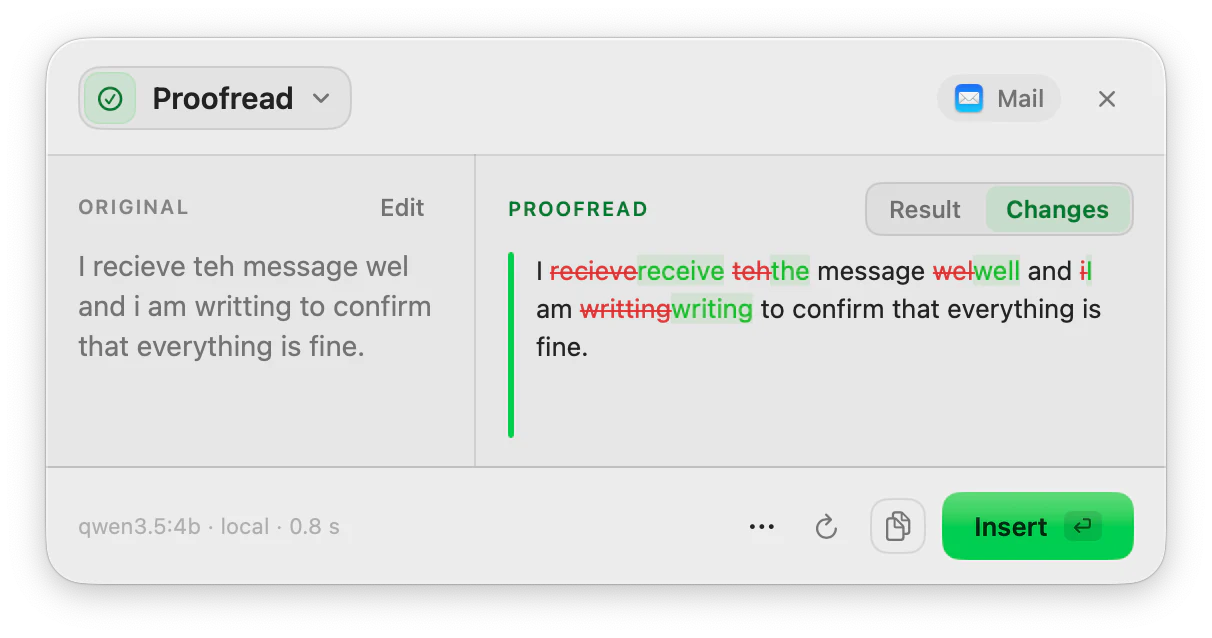
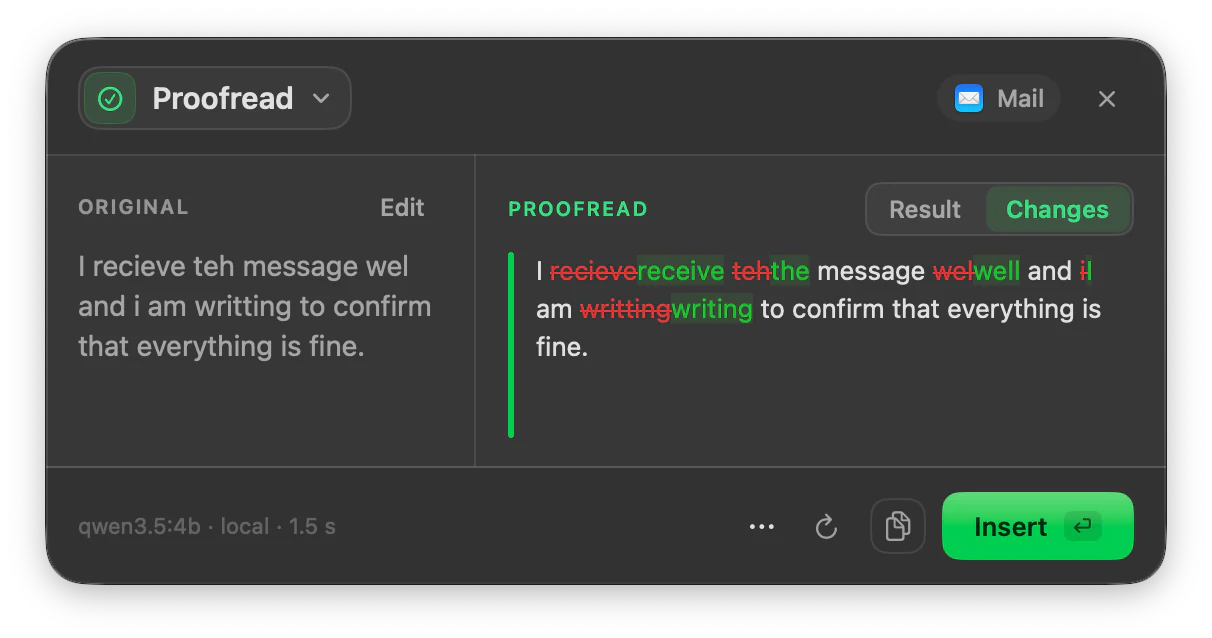
Proofread is the ToneMate action that corrects grammar, spelling, punctuation and style in the text you select on your Mac, keeping your wording and your language. It opens on a Changes view that marks what was added and removed, so you can check each fix before you insert the result.
Quick facts
- Corrects grammar, spelling, punctuation and style, and keeps the language of your text.
- Opens on the Changes view, which marks additions and removals word by word.
- Works with a local model on your Mac or with your own cloud API key.
- Also available while you type, as an optional underline, with the inline assistant.
How it works
- 1
Select the text
Highlight what you want to check: a sentence, an email, a few paragraphs.
- 2
Press your shortcut
Use the shortcut you assigned to Proofread, or open it from the menu bar.
- 3
Read the changes
The panel shows the corrected text with every change marked. Switch to Result to read it clean.
- 4
Insert or copy
Insert replaces your selection; Copy keeps the corrected text on the clipboard.
It corrects; it does not translate
A small model can answer a text in another language than the one you wrote it in. ToneMate tells the model which language your text is in, checks the answer, and retries once with a stricter prompt if it came back in the wrong language. We built this after measuring the problem on our own tests: before the fix, correcting an English text returned it translated into Spanish with 5 of the 7 local models we tried.
Long texts
Long texts are split into pieces so a local model can keep up, and the result is put back together. They take longer: in our tests on one Mac, correcting about 8,500 characters took between 70 and 110 seconds with a small local model.
Good to know
What it does not do, and what you need first.
- Proofread corrects grammar, spelling, punctuation and style. It does not check facts or restructure a long document.
- Quality depends on the model. Small local models make more mistakes than large ones; “Test on this Mac” runs 12 real tests on a local model first.
- The timing we quote comes from one Mac, a small set of texts and a single run per case. Your speed will depend on your Mac and your model.
- It works where you can select, copy and paste text.
Where it helps
An email before you send it
Catch the typo you stop seeing after reading the same draft five times.
Writing in your second language
Get a corrected version in the same language, with the changes marked so you learn from them.
A report or a post
Check a longer text in one go and review the changes.
Messages
Fix a quick message before you hit send.
Frequently asked questions
Does Proofread change my wording or only fix mistakes?
It is asked to fix grammar, spelling, punctuation and style and to leave your wording and meaning alone. The Changes view marks everything that differs so you can reject anything you do not want.
Will it translate my text by mistake?
It is built to avoid that. ToneMate locks the language in the prompt, checks the answer and retries once if the language changed. If the model still fails, you see it in the result and can run it again.
What is the difference between Proofread and Analyze?
Proofread returns the corrected text. Analyze lists up to 6 suggestions you accept or skip one by one, with an explanation for each, plus two scores and a detected tone.
Is my text sent to a server?
ToneMate never sends your text to its own servers. With a local model your text is processed on your Mac; with a cloud model it goes straight to the provider whose API key you added. The app only contacts ToneMate to check your license.
Does it work offline?
Local models and dictation work without a connection once their models are downloaded. The license needs a connection to activate and to be checked again at least every 7 days.
Can I buy or download ToneMate today?
You can download it, but not buy it yet. ToneMate is in free beta: download the app and request a free license key, which has no fixed end date. The plan for the full version is a one-time purchase that includes 2 licenses; when the first stable version comes out, a 30-day free trial starts.
Keep exploring
- AnalyzeReview a text before you send it: suggestions you accept or skip one by one, two scores and a detected tone.Learn more
- Inline assistantOptional suggestions as you type: underlines and a bubble with the fix, only in the apps you allow.Learn more
- RewriteChange the tone and wording of selected text, and compare it with the original before you insert it.Learn more
- Grammarly alternative for MacIf you use a grammar tool on your Mac, here is how ToneMate works and who it may suit.Learn more
Proofread with ToneMate in the free beta
ToneMate is in free beta. Download it and request a free license key: we email it to you.
Last updated: