
Reply
Reply to messages with AI, with the conversation as context
Press your shortcut in a chat or an email and ToneMate drafts one reply from what is on screen. Tell it what you want to say, check the draft and insert it.
macOS 14 or later · Free while in beta · No subscription
In short
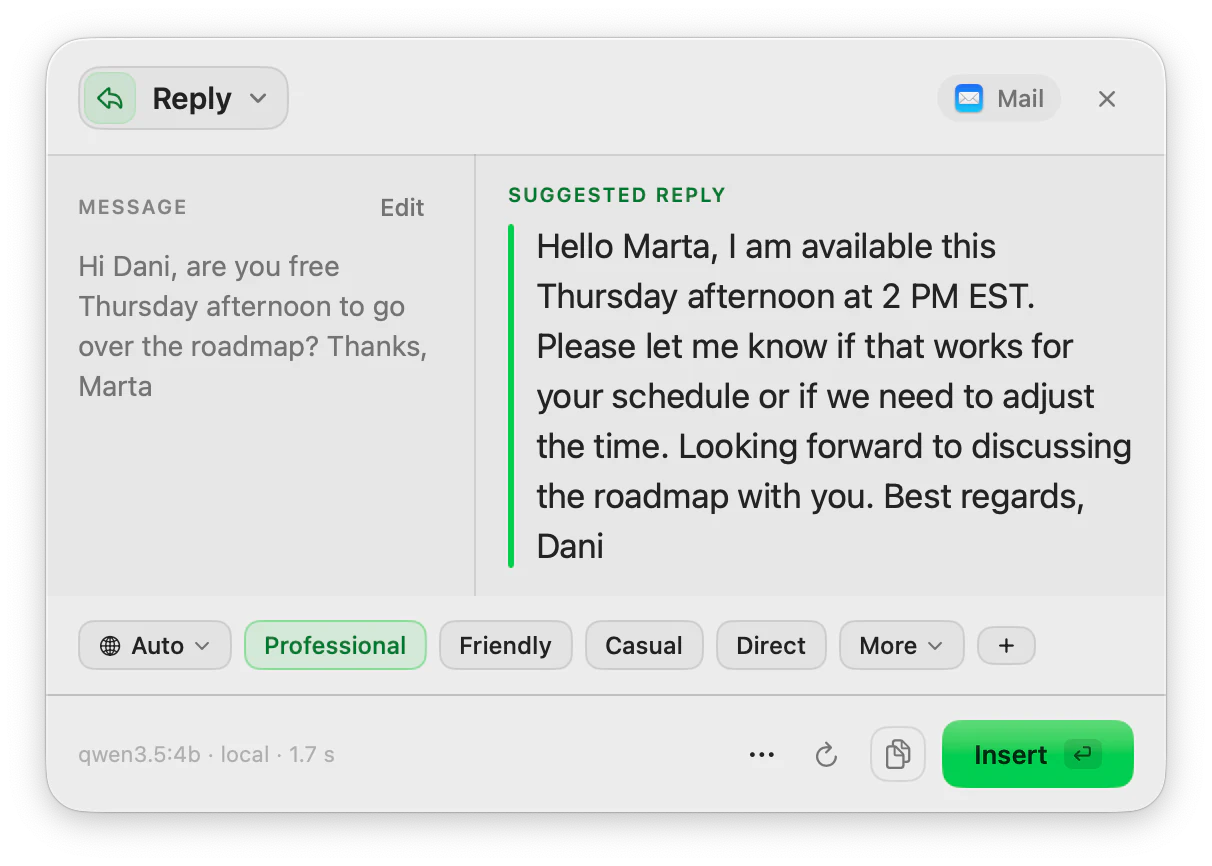
Reply is the ToneMate action that reads the conversation visible on your screen through macOS Accessibility, proposes a tone that suits the kind of app you are in, and writes one reply for you to review. An optional field, “What do you want to say?”, steers the content. What is sent to the model is exactly what you see and can edit in the panel.
Quick facts
- Reads the visible conversation through Accessibility (up to 3,000 characters), or uses your selection if you have one.
- Proposes a tone by type of app (more casual in chat apps, more professional in email and work apps) and you can always change it.
- An optional “What do you want to say?” field takes up to 300 characters.
- Writes one reply per run, in the language of the last message unless you pick another.
How it works
- 1
Open the conversation
Stay in the chat or email where you want to answer. ToneMate does not need you to copy anything.
- 2
Press your shortcut
Assign a shortcut to Reply or open it from the menu bar. The panel shows the text it read from the conversation.
- 3
Say what you mean
Optionally type the point you want to make, such as “I can do Thursday, not Friday”. Without it, Reply writes a short, polite answer that promises nothing specific.
- 4
Review and insert
Edit the draft, change the tone if it is off, and insert it into the reply box yourself.
You see what the model sees
The conversation text is shown in the panel, and that is what goes to the model, nothing more. You can edit it or remove lines before you run Reply. If you use a cloud model, that text goes to the provider whose key you added; with a local model it stays on your Mac.
Written as a reply, not as instructions
The conversation is treated as content to answer, not as instructions to follow, and the prompt tells the model not to invent facts. If you give no intent, it writes a brief, courteous reply that does not commit you to anything.
Good to know
What it does not do, and what you need first.
- Reply returns one answer per run, not several options.
- The tone suggested for each kind of app is a fixed table for now; you can edit the tone in the panel but not the table.
- It reads what the app exposes through Accessibility. We have verified it in a test app and in a web chat in Chrome, and we have not yet verified specific email or messaging apps, so we do not list any.
- There is no voice reply yet.
Where it helps
A customer asks a question
Give the point you want to make and get a courteous draft that answers the thread.
A colleague proposes a time
Say “Thursday works” and get a reply with the right tone for work chat.
An email you keep postponing
Let the draft get you past the blank page, then make it yours.
A message in another language
Replies in the language of the last message unless you choose a different one.
Frequently asked questions
How does ToneMate know what to reply to?
It reads the visible text of the conversation through macOS Accessibility, in the same column as the reply box, up to 3,000 characters. If you select text first, it uses your selection instead. You can see and edit what it read in the panel.
Can ToneMate send the reply for me?
No. Reply drafts the text and you insert it and send it yourself. It never sends a message on its own.
Which apps does Reply work in?
It works where the conversation is readable through Accessibility and you can paste text. We have verified it in a test app and a web chat in Chrome, and we are checking specific apps one by one, so we do not publish a list yet.
Is my text sent to a server?
ToneMate never sends your text to its own servers. With a local model your text is processed on your Mac; with a cloud model it goes straight to the provider whose API key you added. The app only contacts ToneMate to check your license.
Can I buy or download ToneMate today?
You can download it, but not buy it yet. ToneMate is in free beta: download the app and request a free license key, which has no fixed end date. The plan for the full version is a one-time purchase that includes 2 licenses; when the first stable version comes out, a 30-day free trial starts.
Keep exploring
- RewriteChange the tone and wording of selected text, and compare it with the original before you insert it.Learn more
- TranslateTranslate selected text into one of 10 languages from a shortcut, with the model you choose.Learn more
- Inline assistantOptional suggestions as you type: underlines and a bubble with the fix, only in the apps you allow.Learn more
- AI tone rewriterHow to change the tone of a text on a Mac, and how ToneMate lets you type the tone you want.Learn more
Try Reply in the free beta
ToneMate is in free beta. Download it and request a free license key: we email it to you.
Last updated: