
Guide · Choosing a writing tool
Looking for a Grammarly alternative for Mac? Here is how ToneMate works
This is not a feature-by-feature comparison. We have not tested other products for this page, and their features change. It explains how ToneMate works and who it may suit, so you can decide.
macOS 14 or later · Free while in beta · No subscription
In short
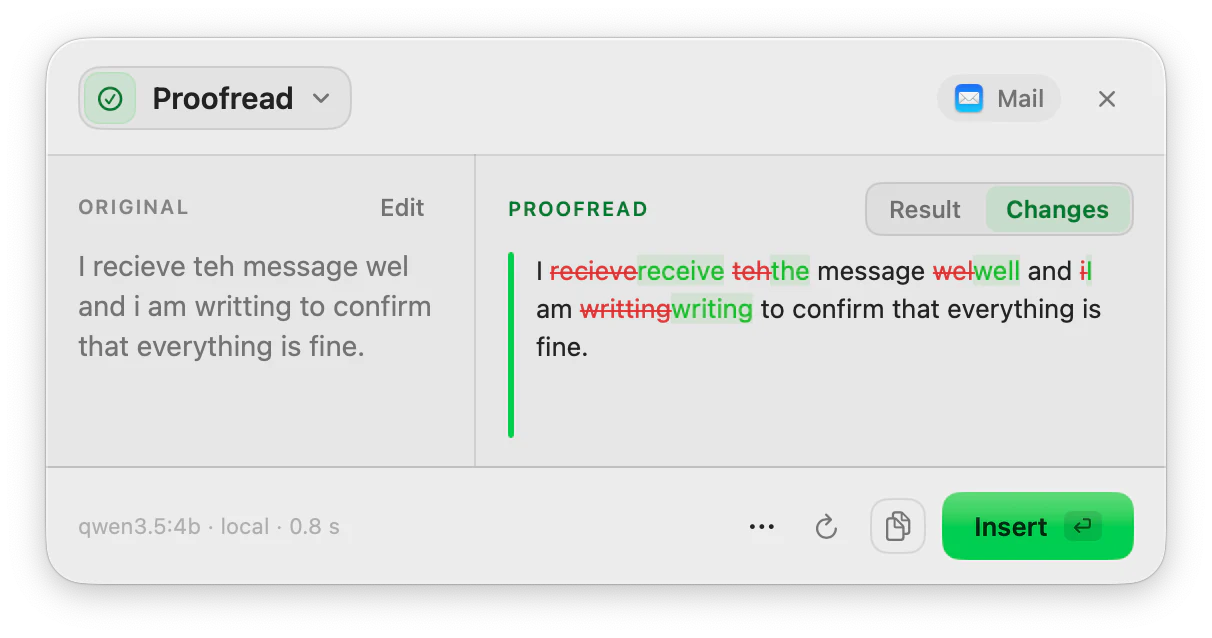
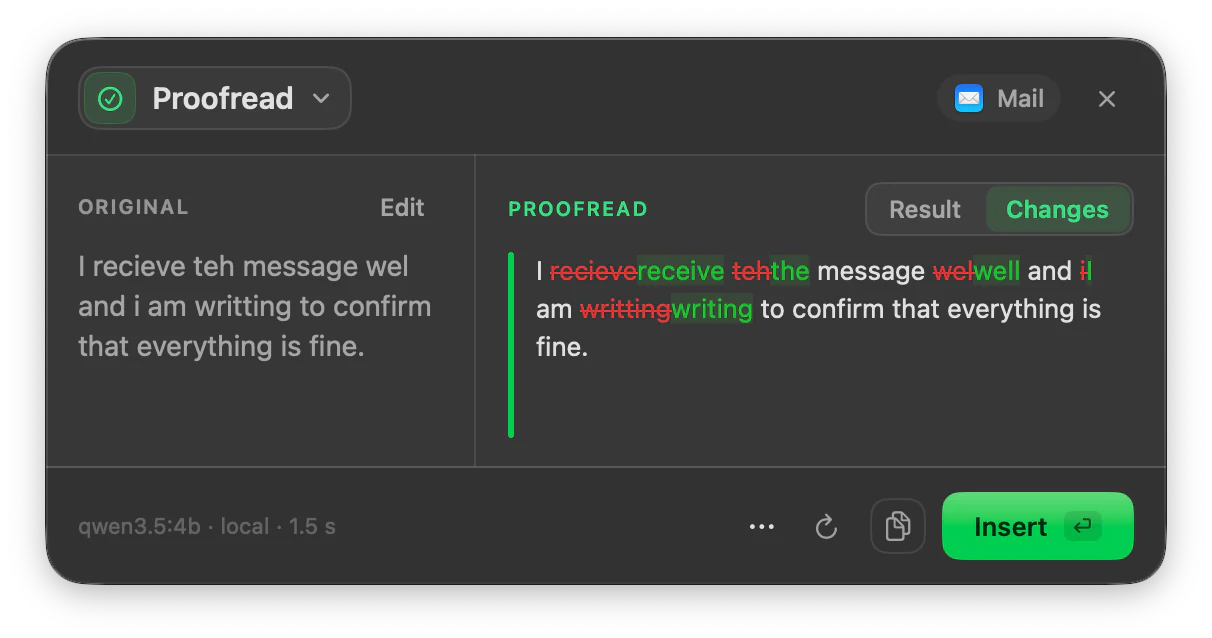
ToneMate is a native macOS app that runs AI actions on text you select, from a global keyboard shortcut: proofread, rewrite, translate, summarize, reply and dictate. You choose the model: one on your Mac through Ollama or MLX, or your own API key from a cloud provider. It is designed as a one-time purchase that includes 2 licenses, with no subscription.
Quick facts
- Works on text you select, with a shortcut you assign, rather than inside a single editor.
- Proofread fixes grammar, spelling, punctuation and style and shows every change.
- An optional inline assistant underlines mistakes as you type, only in the apps you allow.
- You choose the model, local or cloud, and the purchase is planned as one-time, with no subscription.
How it works
- 1
Select the text
Highlight what you want to check, in the app where you are writing.
- 2
Press your shortcut
Run Proofread, or any other action, from a shortcut you assigned.
- 3
Review the changes
See what was fixed, word by word, and accept or copy the result.
- 4
Optionally, turn on inline suggestions
Add the apps where you want underlines while you type.
How the approach differs
Many writing tools work inside their own editor or through a browser extension. ToneMate takes a different route: it is a Mac app that acts on the text you select, in the app you are already using, when you ask it to. The optional inline assistant is the exception, and it only runs in apps you add yourself.
That choice has trade-offs. It means ToneMate is not always watching, which some people prefer and others will miss. And because it is a macOS app, it is not a browser extension and does not run on Windows or on a phone.
Who it may suit, and who it may not
- It may suit you if you write in several Mac apps, want to choose where your text is processed, and prefer paying once.
- It may suit you if you also want to translate, rewrite, reply or dictate from the same place.
- It may not suit you if you need a browser extension, Windows or mobile support, or you do not want to set up a model.
- It is in free beta: you can download it and try it, but it is not on sale yet, and the app is in English for now.
Two approaches to writing help
| A tool built into an editor or extension | ToneMate | |
|---|---|---|
| Where it acts | Inside the editor or the pages where the tool is installed | On the text you select in the app you are using |
| When it acts | Often as you type | When you press a shortcut; optional inline suggestions in apps you allow |
| Where text is processed | Decided by the service | Your choice: a local model on your Mac or your own API key |
| How it is paid | Varies by product | Planned as a one-time purchase that includes 2 licenses |
Good to know
What it does not do, and what you need first.
- We have not verified other products for this page, so we make no claims about their features, prices or quality.
- ToneMate is for macOS 14 or later. It is not a browser extension and is not available for Windows or mobile.
- You need a model: a local one (Ollama or MLX) or your own API key.
- The app is in English for now, and ToneMate is not on sale yet.
Where it helps
You write in several Mac apps
One shortcut family, whichever app you are in, where you can select and copy text.
You care where your text goes
Use a local model and keep it on your Mac.
You want more than grammar
Translate, rewrite, summarize and reply from the same panel.
You prefer to pay once
No subscription is planned.
Frequently asked questions
Is ToneMate a Grammarly replacement?
It depends on what you use a writing tool for. ToneMate proofreads text you select, offers optional inline suggestions in the apps you allow, and also translates, rewrites, summarizes, replies and dictates. It is not a browser extension and is not available for Windows or mobile. We have not compared it feature by feature with other products.
Does ToneMate work in my browser?
It works in apps where you can select, copy and paste text, which includes text fields in a browser, because it acts at the macOS level. It is not a browser extension, and we are still verifying specific apps one by one.
How is it paid for?
ToneMate is planned as a one-time purchase that includes 2 licenses, with no subscription. If you use a cloud model, the provider bills your own API usage. The final price appears in the pricing section once sales open.
Is my text sent to a server?
ToneMate never sends your text to its own servers. With a local model your text is processed on your Mac; with a cloud model it goes straight to the provider whose API key you added. The app only contacts ToneMate to check your license.
Can I buy or download ToneMate today?
You can download it, but not buy it yet. ToneMate is in free beta: download the app and request a free license key, which has no fixed end date. The plan for the full version is a one-time purchase that includes 2 licenses; when the first stable version comes out, a 30-day free trial starts.
Keep exploring
- ProofreadFix grammar, spelling, punctuation and style in the text you select, and see every change.Learn more
- Inline assistantOptional suggestions as you type: underlines and a bubble with the fix, only in the apps you allow.Learn more
- Local AI writing assistantRun ToneMate's writing actions with a model on your Mac, what to expect, and what we measured.Learn more
- RewriteChange the tone and wording of selected text, and compare it with the original before you insert it.Learn more
Try the free beta and judge it for yourself
ToneMate is in free beta. Download it and request a free license key: we email it to you.
Last updated: