
Dictation
Dictate on your Mac: hold, speak, let go
Hold your shortcut and talk. When you let go, ToneMate transcribes your voice on your Mac and inserts the text where your cursor is.
macOS 14 or later · Free while in beta · No subscription
In short
Dictation is the ToneMate feature that turns your voice into text on your Mac. Hold the shortcut to talk and release to insert, or tap it once to start and again to stop. The transcription always runs locally with a Whisper or Parakeet model that you download once, and an optional AI cleanup fixes punctuation and removes filler words.
Quick facts
- Hold the shortcut for about a third of a second to talk (push-to-talk); a quick tap starts and stops a recording; Esc cancels.
- Speech is always transcribed on your Mac, with Whisper (Small, Base, Medium or Large-v3-Turbo) or Parakeet TDT 0.6B v3.
- The AI cleanup is optional and, by default, runs only with local models.
- Voice commands such as “new line” and “new paragraph” work in 6 languages, and a personal dictionary holds up to 100 entries.
How it works
- 1
Hold the shortcut
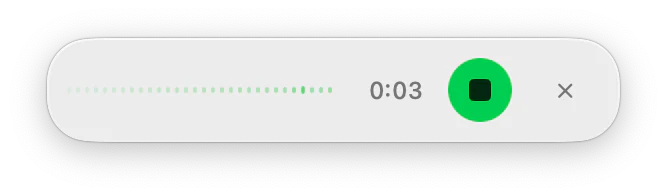
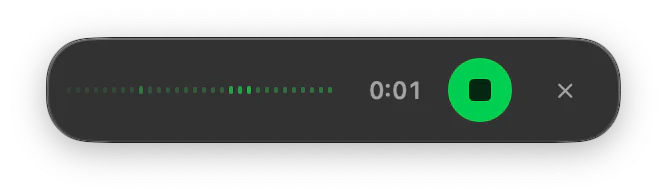
Assign a shortcut to Speech to Text. A small pill with a live waveform shows that ToneMate is listening.
- 2
Speak
Say what you want to write. Say “new paragraph” when you want one.
- 3
Let go
ToneMate transcribes your voice and, if the AI cleanup is on, tidies the text.
- 4
It lands in your text
The result is inserted where your cursor is, and both the heard text and the final text are saved in your history.
Cleanup that cannot make things worse
The cleanup fixes punctuation and capitalization and removes filler words and false starts, with a style that depends on where the text is going: chat, email or code. It is built to fail safe: it has a time limit of 8 seconds with a local model, and if the model fails, answers something other than your text or returns something odd, ToneMate inserts what it heard. Sentences shorter than 4 words skip the model altogether.
You choose when it runs: off, only with local models (the default) or always. With a cloud text model, nothing is sent to the cloud unless you choose it.
Voice commands and your own words
Say “new line” or “new paragraph” and ToneMate types a line break. The commands exist in English, Spanish, French, Italian, German and Portuguese, and only count when you say them on their own: “a new line of credit” is left as it is.
The personal dictionary maps how a word is heard to how you want it written, such as a product name or a surname. It holds up to 100 entries and is also given to the cleanup model.
Good to know
What it does not do, and what you need first.
- You need to download a speech model once (from Hugging Face) before dictating. After that the transcription works offline.
- There is no selector for the transcription language yet: Whisper detects it and Parakeet covers 25 European languages.
- The dictionary improves the cleanup but does not yet feed the recognizer, and there is no long continuous dictation.
- Only the transcription is always local. The cleanup uses the text model you picked, which is local by default; if you choose a cloud model for it, that text goes to the provider.
Where it helps
A first draft by voice
Say the whole message, then rewrite or proofread it with another action.
Chat and email
Dictate in the field you are in and let the cleanup match the style of the app.
Notes while you think
Talk through an idea and get punctuated text instead of a wall of words.
Names and jargon
Teach the dictionary the words that get misheard.
Frequently asked questions
Does dictation send my voice to the cloud?
No. The transcription runs on your Mac with a Whisper or Parakeet model; there is no cloud transcription path in ToneMate. If you turn on the AI cleanup with a cloud text model, the transcribed text goes to that provider, so the default is to use it only with local models.
What is the difference between holding and tapping the shortcut?
Hold it for about a third of a second or more to record while you hold and insert when you release. A quick tap toggles recording on and off. Esc cancels.
Which languages can I dictate in?
It depends on the model you download. Whisper detects the language on its own and Parakeet covers 25 European languages. ToneMate does not have a language selector for transcription yet.
What do I need to set up?
A Mac with macOS 14 or later, the Accessibility permission, and a model: either a local one (Ollama or MLX running on your Mac, which ToneMate can install and test) or your own API key from a cloud provider. Dictation also needs a speech model, which you download once. The first setup takes a few minutes.
Can I buy or download ToneMate today?
You can download it, but not buy it yet. ToneMate is in free beta: download the app and request a free license key, which has no fixed end date. The plan for the full version is a one-time purchase that includes 2 licenses; when the first stable version comes out, a 30-day free trial starts.
Keep exploring
- Speech-to-text writing appA workflow for writing by voice on a Mac: dictate, let the cleanup tidy it, then shape it with other actions.Learn more
- Transcribe audioDrop an audio file and get the text, transcribed on your Mac.Learn more
- RewriteChange the tone and wording of selected text, and compare it with the original before you insert it.Learn more
- Local AI writing assistantRun ToneMate's writing actions with a model on your Mac, what to expect, and what we measured.Learn more
Dictate with ToneMate in the free beta
ToneMate is in free beta. Download it and request a free license key: we email it to you.
Last updated: